Two laptops, one phone, and agents that don't sleep
4 October 2026
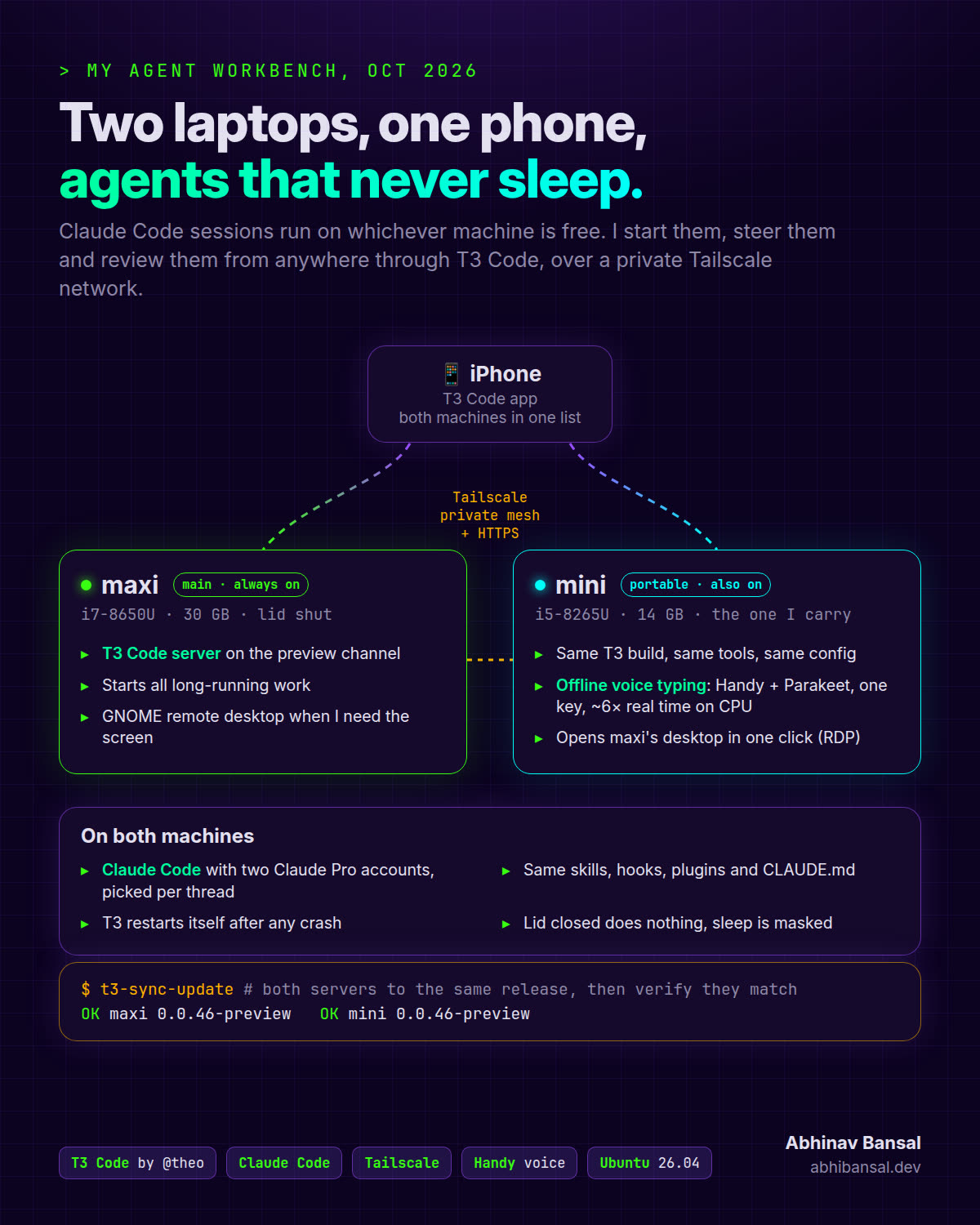
Most of my coding now happens in conversations with agents. This week I rebuilt where those conversations live. They used to run in terminal tabs on one laptop. Now they run on two laptops that never sleep, and I can start, steer and review any of them from my phone.
Here’s the setup, how I got there, and the four things that broke on the first day.
The fleet
| Machine | What it is | Its job |
|---|---|---|
| maxi | HP EliteBook 840 G5, i7, 30 GB | The main box. Lid shut next to a monitor (the built-in screen is broken anyway). Long-running work starts here. |
| mini | HP EliteBook 830 G6, i5, 14 GB | The one I carry. Same tools, same config, its own agents. |
| iPhone | The T3 Code app | Where I check on both, answer questions and start new threads. |
Both laptops run Ubuntu 26.04 and sit on a private Tailscale network with the phone. Nothing is exposed to the internet.
How I used to work
Until a few days ago, every agent was a tab in herdr, a terminal workspace for agents. A small script, herdr-yolo, opened a tab in a project folder and started Claude Code there with Remote Control on, so the Claude app on my phone could follow along. My herdr-fleet mod listed every running agent and nudged me when one was stuck waiting for me.
It worked, but it was built around one desk. A session had to exist in a terminal before my phone could reach it, and everything lived on one laptop.
Why T3 Code
T3 Code, the open-source app from Theo Browne and the Ping team, flips that around. It runs as a small server on each laptop, with Claude Code doing the work underneath. Claude still loads my CLAUDE.md, skills and hooks. What changes is how I reach it:
- Threads instead of tabs. I start a thread from the phone, pick the project, and it runs on the laptop. No terminal needs to be open first.
- Both machines in one list. The app connects to each laptop’s server, so maxi’s and mini’s threads sit side by side.
- Two subscriptions, side by side. I have two Claude Pro subscriptions, and each one shows up as its own provider. When one hits its 5-hour limit, the next thread goes to the other. Within a thread, Opus plans and Sonnet subagents do the well-scoped building, which stretches both.
herdr is still on the desktop for the days I sit at it. T3 is how I work the rest of the time.
Adding a second laptop
mini joined the fleet as a fresh Ubuntu install. I didn’t set it up by hand. My ai-workbench skill has a “move from another machine” step: over Tailscale, the agent copied ~/code and ~/.claude across, left the logins for me to redo, then ran the normal setup to fill the gaps.
Then I asked it to make the two machines match. It audited both and brought every tool, plugin and config file to the same version, from Node and the GitHub CLI to all 17 Claude Code plugins. A clean-up pass freed 16 GB on mini (old installers, caches, leftover themes) and turned off Ubuntu’s usage reporting.
The rule throughout: the agent never runs sudo. When a step needs root, it hands me the exact command and waits.
What broke on day one
A new setup shows its weak spots fast. These four all came up the first day, and each was fixed from the same chat:
- The phone app updated and stopped talking to both laptops. It now needs a newer server protocol than the stable release supports. Both laptops moved to T3’s preview channel, and a script,
t3-sync-update, now updates every machine to the same build and checks that they match. - mini fell asleep in the middle of a task. Idle sleep was already off. The logs showed no lid event and no power button, just a request to suspend. On wake, T3 couldn’t get its port back and gave up after five retries. Now the sleep targets are masked, so nothing can suspend either laptop, and T3 retries forever instead of giving up.
- Remote desktop kept closing right after login. I wanted maxi’s actual screen from mini, and GNOME’s built-in remote desktop fit. But the window opened and closed. The agent read maxi’s logs:
Session creation inhibited. GNOME won’t share a locked screen. The saved connection now unlocks maxi over SSH before it connects. - Voice typing ran slower than I speak. I dictate a lot of prompts with Handy, which runs the speech model on the laptop. The default model was streaming on the weak Intel GPU at 0.64× real time. Parakeet V2 on the CPU runs at 6.2×, so text lands in T3 about a second after I stop talking, and nothing leaves the machine.
None of these were hard. The difference is where I fixed them from: I described the symptom in a chat, and the agent read the logs on the machine that had the problem.
What I still do myself
- Run every
sudocommand, after reading it. - Sign in to things: GitHub, Vercel, the Claude accounts.
- Decide what’s worth building. The agents are fast. Choosing well is still my job.
Try it
Everything above, from the terminal theme to T3, the always-on settings, voice typing and remote desktop, is in ai-workbench. Its README starts with one prompt you paste into Claude Code or any coding agent. The agent sets the machine up, asks before installing anything, and finishes with a doctor check that lists what’s working and what’s left for you.
Thanks to Theo and the T3 team for building the piece that made this click.